
Security and fire alarms save lives and protect property. Adding monitoring to these systems helps ensure safety.
Whether you own a restaurant, small business, office building, industrial plant, apartment, condo, townhome, or are a facility manager at an educational facility, this page covers everything you need to know about monitoring, why it matters, the different types, budgeting and inspection tips, and how to transition from one provider to another.
Monitoring Matters: Fire
A fire alarm alone can’t serve as a fire monitoring system. It simply detects and alerts occupants that a fire is present–there’s no connection between the fire alarm and alerting a fire station. This is why having a fire monitoring system in place is a requirement in most jurisdictions.
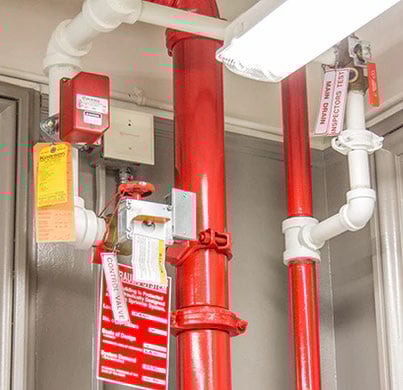
Fire Protection System
While the National Fire Protection Association (NFPA) recommends several fire monitoring system types, the two main ones are conventional and addressable systems. Conventional systems can detect the general area of a building on fire, while addressable systems can pinpoint the exact location.
Regardless of the monitoring system in place, they must be accompanied by alarm systems to be effective. These two components work together to provide the best fire protection coverage possible. The most common fire alarm systems are:
-
Fire sprinkler and suppression systems
-
Kitchen hood suppression systems
-
Fire doors and ventilation systems
-
Emergency lighting and door signs
Simply put, a fire monitoring system is an integrated add-on to a fire alarm system. When the fire alarm is activated, the monitoring system immediately sends an alert to a call center. From there, an operator will contact the building and/or dispatch the nearest fire department depending on the severity of the signal.
Resource: Benefits of third party monitoring of fire alarm systems
While there are instances where a fire monitoring system is not legally required, it is still a good idea to implement for many reasons, such as:
Discounted Insurance
You may be eligible for a discount on insurance premiums as a fire monitoring system greatly lowers your risk of filing a high-damage claim.
Limited False Alarms
With a highly responsive and reliable system in place, the provider will verify the fire before contacting emergency services–meaning no more false alarms and wasted time and resources.
24-Hour Surveillance
Even if your building is vacant or fully occupied, it is always being monitored. If a fire does break out, your building can receive the fastest response from emergency personnel.

Common Questions About Fire Monitoring
Is a fire alarm the same as a fire monitoring system?
No. A fire alarm detects smoke or heat and alerts the people inside a building. A fire monitoring system connects that alarm to a central call center, which contacts the fire department whether or not anyone is present to respond. In most Minnesota jurisdictions, monitoring is required by code—the alarm alone isn’t enough.
Do I need fire monitoring if my building is always occupied?
Occupancy doesn’t eliminate the requirement or the risk. Fires most often cause catastrophic damage during hours when buildings are empty or partially staffed. More practically, building occupants may not know whether an alarm has been dispatched or ignored—monitoring closes that loop automatically.
What’s the difference between a conventional and an addressable fire monitoring system?
Conventional systems identify the general zone of a building where a signal originated. Addressable systems pinpoint the exact device that triggered the alarm—a specific detector on a specific floor, for example. For larger or multi-floor buildings, the difference matters considerably when a fire department is responding and needs to know exactly where to go.
How often does NFPA 72 get updated, and does Minnesota follow it immediately?
The National Fire Alarm and Signaling Code, NFPA 72, is revised on a three-year cycle. Minnesota typically adopts new editions with a lag of one to two additional years. That means buildings may be operating under a code that’s several years behind the current NFPA standard. Staying current with your inspection and service schedule—rather than waiting for a code mandate—is the best way to stay ahead of that gap.
Upgrading Your System
If you already have a fire monitoring system in place, you need to keep it code compliant. The National Fire Alarm & Signaling Code, NFPA 72, gets updated every three years. It usually takes Minnesota a couple extra years to adopt the latest code. Ask yourself: when was the last time you had your building’s fire monitoring system serviced or inspected? If the last inspection occurred at first purchase, it’s long overdue for you to upgrade your system.
Older alarm and detection systems are not equipped to respond to quick and intense fires. Building and interior furnishing materials have changed over the years. Furniture, appliances, the range of plastic products, and other modern materials all burn at a faster rate than older furnishings. This leaves you with less time to respond to an emergency, and if your system isn’t performing optimally, it can lead to a total loss.
Older fire suppression and sprinkler systems are difficult and expensive to maintain. Plus, the impact that years of heat, humidity, and cold have on wires and circuit boards makes them susceptible to failure.
Design a System that Works for You
Whether you are looking to upgrade or start fresh with a fire monitoring system, focus on size, location, industry, and features. These variables will dictate what specific features you’ll need to make a code-compliant protection system.
Additionally, assess cold and hot weather performance when customizing a fire safety system. Freezing temperatures can place fire safety systems at risk, rendering them ineffective if there is a rupture.
Monitoring Matters: Security and Access Control
Having 24-hour vigilance for fire protection is great, but it’s just one part of building security. How can you protect your building and its occupants against other threats, like vandalism or theft? For this, a customized security system with intrusion detection can help. From camera placement and video storage capacity, to control access systems, the precautions you have in place can be the difference between peace of mind and chaos.
Over the next 20 years, 75% of all homes in the United States will be broken into, regardless of the neighborhood. This shocking statistic begins to make more sense, considering 46.9% of people don’t have a home security system installed in their home.
For owners and operators of industrial, commercial, and/or residential buildings, having your security system monitored helps reduce financial and legal risk. This form of access control/security monitoring generally has the following features:
- Detectors (cameras)
- Keypads (access control)
- Control electronics (access control)
With today’s technology, you can easily customize your system to meet the needs of your specific type of property. One effective way to upgrade your security is by adding cameras.
Resource: Factors to consider when adding cameras to a security system
Determine Camera Placement 

Cameras should cover main entrances, stairwells, and first-floor windows, as well as the paths leading up to them. Parking lots and garages are very risky areas and should be monitored at all times.
As for the number of cameras needed, place each camera to cover as much area as possible without overlapping another camera’s feed. Pay attention to the field of view to eliminate blind spots that could reduce the effectiveness of your system.
System Specification and Set-Up
You should also consider each camera’s environment when deciding on placement. For instance, if you are monitoring the outdoors, select a camera that is equipped with the proper protection against the elements.
Another factor to consider is lighting. Ensure that the resolution will be clear enough even in low lighting. At the very least, we suggest using a 5-megapixel camera for outdoor use and a 2-megapixel camera for indoor.
Fixed cameras are necessary for building a sound surveillance system. For this, you will want to install a Pan-Tilt-Zoom (PTZ) camera, an ideal choice if you are hoping to actively monitor for suspicious activity.
Consider Storage
When you have cameras in place, you’ll next need to determine where to store the footage. The Network Video Recorder (NVR) is an essential element of your security system. NVR systems allow you to record and store videos on a hard drive for later viewing.
Additionally, you can opt for Digital Video Recorder (DVR) if you have analog cameras or use modern closed circuit (CCTV) camera systems that let you store footage on the cloud. This way, you can store large video files and have access to your security feeds for a longer period of time.

Common Questions About Security Camera Systems
How many cameras do I actually need?
That depends on your building’s layout, entry and exit points, parking areas, and what level of detail matters for your purposes. For a useful starting point, each camera should cover as much area as possible without overlapping another camera’s field of view. Most buildings benefit from a professional site survey before purchasing, because gaps in coverage are harder and more expensive to correct after installation than before.
What resolution do I need for useful security footage?
For outdoor cameras, 8 megapixels is a practical minimum that holds up when zooming in on license plates or faces. Indoor cameras can typically function well at 5 megapixels. Resolution matters most in low-light conditions and when footage needs to serve as evidence—blurry footage doesn’t hold up in insurance claims or investigations. Lighting in your camera zones is just as important as the camera spec itself.
Access Control
Access control systems act like a virtual wall, shielding people, property, and data from the dangers of malicious intruders. They ensure that your organization's assets are secure in both physical and digital spaces—keeping valuable information safe from harm.
Each business and building will have unique needs. When thinking of implementing access control, consider the following:
- Do your entry and exit points support the kind of access control you want, and do they fit your specific security needs?
- Do you want every door to have access control?
- Who are the doors meant for: employers, residents, students?
5 Types of Card Access Control Systems
Card access control is a reliable way to manage foot traffic security. Thinking through how you want your door access control to work, as well as how it will integrate with your security monitoring system, will help inform your system selection. Types of card access control systems include the following:
- Swipe Cards: With magnetic stripes like credit cards, they are swiped through the card reader at the door, and the user’s access code and credentials are immediately read. Swipe cards are one of the oldest forms of card access and are generally reliable, although the magnetic stripes do tend to wear out over time.
- Proximity Cards and RFID Cards (Radio Frequency Identification): Same logic as the swipe card, however these communicate with the reader via a small transmitter whenever a user is within range.
- Smart Cards: These are much faster cards that are capable of writing data. This allows the card to store much more information and makes them useful in a variety of credential options and applications. This is a good option when wanting to give individuals varying levels of access to a building.
- Biometric Readers: Attached to a network, they measure a person’s unique physiological characteristics, such as fingerprint, finger-vein, palm, retina, iris, face, and voice
- Cloud-Based: With cloud-based access control, you can manage and update one security card or your entire system in real-time. A centralized access control dashboard makes it easier to manage your entire organization’s security. In case of a lost or stolen key card, you can simply revoke access from the control panel. You can also increase a user’s clearance in an instant.
Unauthorized access to your building can be a major risk. To stay ahead of potential threats, install security monitoring systems or implement access control solutions. These options will give yourself peace of mind should a breach ever occur—and grant the ability to pursue legal action if necessary.
Hosting Your Access Control System
Once you’ve selected a card access technology, you’ll need to choose a hosting platform. Access control data—credential management, door schedules, audit logs, user permissions—has to be stored and managed somewhere. The two primary options are on-premise hosting and cloud-hosted (third-party) hosting. For most multi-location businesses, either approach has significant implications for IT burden, cost structure, and operational continuity.
On-Premise Hosting
With an on-premise system, the access control software and database run on servers your organization owns and maintains, typically in an IT room at a central location. You have direct control over the hardware and don’t pay ongoing hosting fees. For organizations with strong internal IT capacity, regulatory restrictions on third-party data hosting, or a single location, on-premise hosting can be a practical fit.
The tradeoff: your IT staff owns the system’s uptime, updates, and security patches. When that person leaves, institutional knowledge about system configuration goes with them. System failures at the server level can affect access control across all connected doors until IT can respond.
Cloud-Hosted Access Control
With a cloud-hosted system, your access control software and data are managed by a third-party provider on remote servers. Credentials, door schedules, and audit logs are accessible from any browser or mobile app, from any location. Firmware updates and security patches happen automatically, without requiring IT staff to schedule and manage them.
For organizations managing multiple locations, cloud hosting offers practical advantages. Adding a new location doesn’t require new server infrastructure. Revoking a credential or adjusting a door schedule happens immediately, across all locations at once, from a single dashboard. When a staff member leaves the team managing the system, there’s no knowledge gap to fill—the hosting provider carries the technical continuity.
The cost model also shifts: rather than a capital expenditure for server hardware and a licensing fee, cloud hosting converts access control into a predictable monthly operational expense. For organizations that budget annually across multiple properties, that predictability is often worth more than the theoretical savings of owning the hardware outright.
Which Option Fits Your Organization?
The right answer depends on your number of locations, IT staffing, budget structure, and whether your industry has specific data hosting regulations. A few useful questions to bring into that evaluation:
-
Do you have dedicated IT staff with the capacity to manage on-premise server infrastructure—including nights and weekends if a failure occurs?
-
Are you managing more than one location, or do you expect to add locations within the next three to five years?
-
Does your organization prefer to convert security infrastructure from a capital line item to an operational expense?
-
Are there industry or regulatory requirements that restrict where your access control data can be hosted?
Neither answer is universal, which is why the evaluation questions matter more than a default recommendation.
Common Questions About Cloud Hosting
Is cloud-hosted access control secure?
Yes, and in many cases more consistently secure than on-premise alternatives. Reputable hosting providers run security patches and firmware updates on a continuous basis, while on-premise systems often go months or years between updates because IT staff have other priorities. The practical risk with cloud hosting is internet dependency: if your connection goes down, local access behavior depends on how the system is configured (most systems allow offline fallback rules to be set in advance).
What happens if the hosting provider goes out of business?
Reputable providers maintain documented data export policies and provide contract terms that address business continuity. When evaluating a cloud-hosted access control partner, ask specifically about data portability, contract exit terms, and what happens to your system in a service interruption.
Fire and Security Monitoring Inspection and Budgeting Tips
An integrated fire and security monitoring system will keep you, your occupants, and building safe. There is no “one size fits all” approach to fire and security monitoring, but there are baseline recommendations within each category.
We know this is a lot of information to manage. To help you out, here are some recommendations to take the stress and worry out of planning and budgeting for inspections.
Save Slowly
Set aside some funds each month to account for unexpected repairs or replacements of a fire and alarm system. As a general guide, saving 1% to 5% of the cost per month is recommended if your current system is getting on in years. That way you'll have resources available when emergencies crop up!
Life Safety Month
If you operate multi-unit housing or something with occupants, designating a “Life Safety Month” is a good idea to get all of your inspections done. Rather than spacing out inspections throughout the year, complete them in one month. Alert occupants ahead of time and use this as an opportunity for them to practice their exit plans in case of emergency.
Keep Track of Inspection Requirements
If a “Life Safety Month” is not feasible for you or your building, use this simple inspection scheduling form to help you keep track of when inspections need to be done. Not only will this help you remember inspections, but it serves as a budgeting tool as well.
Resource: Fire and security checklist for K-12 schools in Minnesota
Common Questions About Inspections and Compliance
What happens if I miss a required fire or security inspection?
The consequence depends on how far out of compliance you are and whether your city uses a compliance tracking system. In Minnesota, a growing number of cities use a platform called Compliance Engine, which flags properties as delinquent when inspection records aren’t uploaded. A flagged property receives a notice from the city, and if the situation isn’t addressed, the fire marshall can become involved. Extreme non-compliance can ultimately result in loss of occupancy.
The practical path forward when you’re running behind: contact your inspection provider and get on the schedule. Most fire marshalls are reasonable if you can demonstrate you’ve engaged a vendor and have a confirmed appointment. The properties that face serious consequences are typically the ones that don’t respond at all.
Do I have to fix every deficiency my inspection report identifies?
Required deficiencies must be corrected. There’s no way around items that make your system non-functional or non-compliant. The timeline for correction depends on the severity. Routine deficiencies (painted sprinkler heads, obstructed extinguishers, tags that need updating) are typically addressed at your next scheduled service visit. Critical deficiencies affecting system operation usually require faster resolution. Your inspection report should classify each item’s urgency—if it doesn’t, ask your vendor to clarify before you decide what to defer.
What is Compliance Engine and does it affect my property?
Compliance Engine is a software platform that municipalities purchase to track fire and life safety inspection records for properties within their jurisdiction. When Brothers Fire & Security completes an inspection at a Compliance Engine city, the inspection report is uploaded directly to the platform, marking the property as current. If your city uses Compliance Engine and your records aren’t uploaded, the system treats your property as out of compliance by default — even if inspections have been completed but weren’t filed through the platform.
Several Minnesota cities use the system, with more adopting it each year. If you receive a compliance notice from your city and aren’t sure whether your inspections are on record, contact your inspection vendor to confirm the upload was completed.
Can I use this module with existing HubSpot themes?
Yes, this module integrates smoothly with any HubSpot theme, complementing your design and functionality needs.
Consolidating Fire and Security Services for your Building
Building maintenance requires a proactive plan based on budgets, operations, staffing, equipment life cycles, laws, and regulations. With all of this and more to oversee, keeping track of the various vendors who supply these services can be overwhelming. If that alone is not a good enough reason to consolidate your services, here are a few other considerations to make.
1. One Contact for Everything
As simple as it sounds–one contact means one contact. Instead of a patch-worked team from different vendors, you’ll have one integrated team working together towards a singular goal. There also is a huge added advantage of simplified billing and paperwork, making it easier to keep track of invoices and billing information.
2. Eliminate Noncompliance
Having only one provider manage all fire and safety systems can help you maintain consistent policies while meeting necessary regulations, sidestepping any potential compliance issues or unwanted risks associated with a multitude of solutions from multiple vendors.
3. Time and Cost-Effectiveness
Your communications will become much faster when you only need to connect with one point of contact. You may also gain access to bundle-based pricing, reducing your overall fees and expenses (saving you money and paperwork).
4. Establish a Trusted, Long-Lasting Relationship
Fewer vendors mean fewer relationships to manage. Working with a single vendor for your fire and safety solutions helps create an atmosphere of reliability, trust, and quality–so you know your interests are in safe hands.
If your monitoring needs are not being met and your vendors are causing you a headache, it’s time to make the switch. You need a vendor who cares just as much about your building as you do.
Switching to a New Vendor? These Questions are Worth Asking.
Do you subcontract your annual inspections?
Some vendors win contracts and assign the actual inspection work to rotating third-party technicians. If you’ve noticed unfamiliar faces showing up with no knowledge of your systems or history at your property, that’s likely why. Ask directly: are the technicians employees of the company, or contractors? A vendor who subcontracts core inspection work has less control over the quality and consistency you’re paying for.
What happens if my fire marshal visit falls before my scheduled inspection?
This situation comes up, and how a vendor handles it is telling. A vendor who manages this well will proactively coach you: contact the fire marshall before the visit, confirm you’re on a vendor’s schedule, and provide the inspection date. Most Minnesota fire marshals accept that, as long as you’ve made contact. If your current or previous vendor left you to figure that conversation out on your own, ask the next one specifically how they handle it.
How do you handle Compliance Engine uploads?
If any of your properties are in a Compliance Engine city, ask your vendor whether they upload inspection results to the platform directly and how quickly that happens after an inspection is completed. Delayed uploads can trigger compliance notices even when your inspections are current. This is a process question, not a capability question. Any qualified vendor should handle it, but not all handle it consistently.
What does your billing look like for unplanned service visits?
If unexplained line items have been a frustration with your current vendor, this question cuts to it quickly. Ask how unplanned charges are documented and whether you’ll receive an explanation before you’re billed. Ask to see a sample invoice. A vendor with a clean billing process won’t hesitate to show you one. A vendor who gets vague about it is worth noting.
Can you service all three divisions—fire alarm, fire sprinkler, and suppression—under a single agreement?
Many building operators use two or three separate vendors for what are essentially related services. That means separate scheduling, separate inspection coordination, separate invoices, and separate points of contact when something needs immediate attention. A vendor that covers all three divisions can schedule coordinated visits, simplify billing, and provide a single point of accountability.
Are you under private equity ownership, and has that changed how you operate?
Much of the fire and security industry has been acquired by private equity over the past decade. That matters because the service problems property managers describe most often tend to cluster around post-acquisition companies. Ownership status is public information. It’s a reasonable thing to verify before signing an agreement, especially if the company you’re considering has changed hands in recent years.
Brothers Fire & Security takes an integrated approach to your fire and security needs. Whether it’s bundling your fire and security systems or providing one service, we’ll act as your trusted strategic partner, bringing the latest technology, processes, and systems to your business to save people’s lives and protect your buildings.
