5 min read
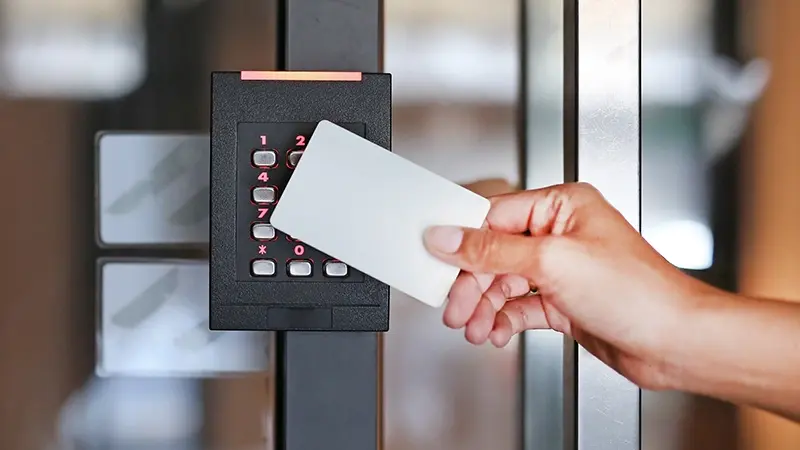
Physical keys are a thing of the past. Today, every door in your building, from the front entrance to server rooms and stairwells, is a potential entry point, and each one needs a strategy behind it.
Managing door access well means thinking through both the hardware and the human side: who gets access, under what circumstances, and what happens when something changes. The three examples below show what that looks like in practice.
Daycare Centers
Daycares may have the highest access stakes of any environment. The wrong person getting in — or a child getting out — can have serious consequences.
Good access control here means verifying that the right parent is picking up the right child, keeping vendors to designated areas, restricting spaces like kitchens and administrative offices, and making sure children can't exit without supervision. That includes playground gates and exterior doors, not just the front entrance.
But the hardware only works if the policies behind it are followed. If a contractor is buzzed in without signing in, or a door is propped open during a delivery, it creates a gap. Policies, training, and hardware have to work together.
Senior Living
In a senior living center, staff and volunteer roles change often, and access privileges need to keep up. A memory care wing has different requirements than independent living. A volunteer leading activities shouldn't have the same credentials as a nurse who accesses medication rooms. Regular credential reviews keep the system working consistently, not just after something goes wrong.
Multi-Family Housing
In a multi-family unit, owners need to think about everything from mailboxes and garage access to moving in/out, guest policies, package and food deliveries, garbage removal, and amenity access. How will door access be compromised if a card is lost or stolen? What happens when someone is locked out?
Multi-family housing also deals with higher credential turnover. Residents move in and out, maintenance staff changes, and seasonal workers come on for grounds and pool upkeep. In each of those transitions, access policies either get followed or they don't. Deactivating a former resident's credentials the day they move out prevents incidents.
The same applies to contractors and vendors who work across multiple properties: they should have access only where they need it, for as long as they need it.
Managing Vendor and Seasonal Staff Access
Vendors, contractors, and seasonal employees are a common source of access gaps, because they often fall outside normal onboarding and offboarding processes.
A few practices help:
- Issue temporary credentials with expiration dates, instead of permanent access that has to be manually removed later.
- Keep vendor credentials separate from staff credentials, so each group only reaches the areas they need.
- Assign someone to own credential management, especially during busy hiring periods.
- Review the full access list at least quarterly. Credentials that should have been removed months ago are one of the most common findings in security audits.
What an Access Breach Costs
When access control fails, the financial damage is usually the first thing people notice. Stolen equipment, property repairs, and insurance impacts are real. What tends to get underestimated is everything else.
An incident typically triggers an investigation: pulling footage, auditing logs, interviewing staff, and coordinating with building management or law enforcement. That takes time. For property managers overseeing multiple sites, one incident at one location can pull focus away from everything else.
Breaches also affect resident and tenant confidence. People notice when something goes wrong in their building. Some will ask questions, while others will quietly weigh their options at lease renewal. Reputational cost is harder to measure, but it tends to stick around longer.
Strong access policies do not eliminate all risk, but they can limit the damage from a credentials gap.
5 Types of Card Access Control Systems
Card control systems are the most common door access security tool, and they’re highly effective. You probably use at least one of these:
-
Swipe Cards: With magnetic stripes like credit cards, they are swiped through the card reader at the door, and the user’s access code and credentials are immediately read. Swipe cards are one of the oldest forms of card access and are generally reliable, although the magnetic stripes do tend to wear out over time.
-
Proximity Cards: Held near the card reader, they don’t need to make physical contact with the reader.
-
RFID Cards (Radio Frequency Identification): Used for identifying an object, such as packages. It’s also another way of referring to a proximity card, in this case by the actual technology.
-
Smart Cards: These are much faster and capable of writing data, in addition to just reading it. This allows the card to store much more information and makes them useful in a variety of credential options and applications.
-
Biometric Readers: Connected to a network, biometric readers identify people using physical characteristics like fingerprints, palm scans, or facial recognition. Because you're verifying a person rather than a card, it's a more secure option. Data is encoded, not stored as images, so privacy is protected.
Door Safety and Code and Card Management
Before selecting or upgrading a system, identify your needs first. It will make implementation smoother and reduce the chance of gaps later.
- Do your doors support the kind of card access you want, and do they fit your specific security needs?
- Do you want every door to have card access?
- Who are the doors meant for: employers, residents, students?
- Are there too many employees/residents/students to have an effective access system?
- Do vendors, employers, residents, and students all use different codes based on their access needs?
- Will all the residents (multi-family, senior living) carry their own FAB-like device? Will the card open the main doors as well as their units?
- Do daycare employees FAB to track payroll?
- Do you set your door access calendar for dates and times (the calendar will progress in real-time, schools need door access based on open and close hours, summer hours, visiting hours, special events, and holidays)?
Updates and credential management:
- How often are codes/cards updated?
- Who has authorization to change codes?
- How is code change communicated and processed?
- Are everyone's credentials reviewed quarterly?
- Are employees removed from the list after getting fired or leaving?
- Has employees’ status changed based on building location or task (people graduate from school)?
Emergency considerations:
- Is there an emergency lock box KNOX system?
- What is the emergency door access process and who does what?
- How is card access impacted by emergencies?
Installation and maintenance:
- Is your door contractor aware of your plans, and are there any limitations with your existing doors?
- Is the card access hardware you're considering compatible with your door types?
- Are you prepared for the installation to alter the original face of the door?
- If retrofitting, do your technicians have experience working with your specific doors?
- Are there restrictions on who can service your doors, particularly if they are higher-end?
Why Policy Matters as Much as Hardware
A good access control system is a strong starting point. How well it performs depends on the policies behind it.
Buildings with clear policies tend to catch problems before they escalate. Regular credential audits surface former employees still in the system. Tracked vendor access creates a record when something goes missing. Seasonal staff credentials with built-in expiration dates make offboarding largely automatic.
Modern access control platforms make this manageable across multiple properties, with one interface for credentials, schedules, and audit reports. The right system, paired with clear policies and defined ownership, is what turns door access from a compliance checkbox into something that protects your building and the people in it.